"3-column pricing table with a monthly/yearly toggle for a boutique yoga studio" is one sentence for a person, but for a page builder it's dozens of nested elements: containers, headings, price lines, feature lists, buttons and a toggle that switches every price at once. When we built DEV3 AI Content & Layout Builder, our WordPress plugin for Elementor, WPBakery and the block editor, the layout generator had to return exactly that: real, editable builder elements, not one HTML blob and not a screenshot of a design. This article covers how a text prompt becomes native Elementor containers and WPBakery rows, and what it took to get large structured JSON out of the Google Gemini API reliably.
Why not ask the model for Elementor JSON directly?
Elementor stores a page as a tree of elements with elType, widgetType, random 7-character IDs and settings objects whose keys differ from widget to widget (title and header_size for a heading, editor for text, icon_list for lists, tabs for accordions). WPBakery stores shortcodes such as [vc_row][vc_column width="1/3"]…, with its own escaping rules. We could have asked the model to produce either format directly, but that has three problems:
- The model would have to learn two private formats, including details it often gets wrong, like unique IDs, column fractions and the two Elementor layout modes.
- Every error would reach the editor, where a malformed element can break the canvas.
- The two builders would drift apart, since a prompt tuned for one wouldn't help the other.
Instead, the model fills one builder-neutral layout tree, and deterministic PHP turns that tree into each builder's format.
The layout tree
The tree is small on purpose:
{ title, sections: [ { name, background: none|light|dark,
    columns: [ { width, featured, widgets: [ widget ] } ] } ] }
There are 15 widget types: heading, text, button, image, icon_list, icon_box, price, period_toggle, accordion, tabs, testimonial, counter, divider, spacer and html. Layout_Schema::response_schema() describes this tree to the API as a response schema, with enums for widget type, heading level, alignment, button style and section background, so a large share of possible mistakes can't even be expressed.
The pricing card is the most interesting widget. If a model is free to build a plan from separate heading, text and list widgets, the results vary from plan to plan: prices in headings, features as paragraphs, plans with no button. So a plan is one price widget with a nested object:
'price' => array(
	'type'             => 'OBJECT',
	'properties'       => array(
		'plan'       => $string,
		'currency'   => $string,
		'amount'     => $string,
		'period'     => $string,
		'amount_alt' => $string,
		'period_alt' => $string,
		'features'   => array( 'type' => 'ARRAY', 'items' => $string ),
		'button'     => $string,
		'featured'   => array( 'type' => 'BOOLEAN' ),
	),
	'required'         => array( 'plan', 'currency', 'amount', 'period', 'features', 'button' ),
	'propertyOrdering' => array( 'plan', 'currency', 'amount', 'period', 'amount_alt', 'period_alt', 'features', 'button', 'featured' ),
),
(condensed from Layout_Schema::response_schema)
amount_alt and period_alt carry the second billing period. A separate period_toggle widget, placed once above the plans, holds the two labels. The system instruction states the rules in plain language: one price widget per plan, never split a plan, never leave price fields empty, mark exactly one plan as featured, and make column widths add up to 100.
Normalise, then convert
The model's answer goes through Layout_Schema::normalize() before any builder sees it. That step is what keeps the converters simple:
- Unknown widget types are dropped. At most 8 sections, 6 columns, 12 widgets per column and 12 items per list are kept.
- Column widths are rebalanced so every section adds up to exactly 100%. Missing or zero widths become equal shares.
- Text is sanitised by field. Headings and labels become plain text,
textwidgets go through an HTML parser that allows only basic tags, and URLs are cleaned withesc_url_raw, defaulting to#. - Icons are validated. Only Font Awesome class names such as
fas fa-checkget through.fa-solidis mapped tofas, and a test confirms thatjavascript:alert(1)becomes the default check icon. - A price without an amount is downgraded. If the plan has a name, it becomes an
h3heading. If it has nothing usable, it is removed. The page never gets an empty price card.
After normalisation, the tree is guaranteed to have at least one section with at least one column. Anything that fails returns a retryable "the AI did not return a usable layout" error.
Elementor: containers or sections
Layout_Elementor converts the tree into Elementor's element JSON using free core widgets only, so the output works without Elementor Pro. It supports both of Elementor's layout systems and picks one by reading the site's container experiment:
- Container mode: each section becomes a boxed flex container with
flex_wrapand a 24 px gap, and each column becomes an inner container. Because flex gaps take space, a column's width is set tocalc(33.333% - 16px)for three columns rather than a plain 33.333%, and to 100% on mobile. - Section mode: classic
sectionandcolumnelements with_column_size, for sites that still use the legacy layout.
One neutral widget can expand into several Elementor widgets. A price widget becomes an optional "Most popular" label, an h3 heading for the plan name, a text-editor widget for the price line, an icon list of features and a full-width button. A featured column gets a tinted background, an accent border and rounded corners. Every element gets a fresh random 7-character hex ID, and a test walks the whole output to assert that no ID repeats.
In the editor, the converted elements are inserted through Elementor's own command API, the same route as a manual edit, so undo, history and the Structure panel all behave normally:
onInsertLayout: ( payload ) => {
	const target = elementor.getPreviewContainer();
	let index = typeof at === 'number' ? at : undefined;
	payload.elementor.forEach( ( model ) => {
		$e.run( 'document/elements/create', { container: target, model, options: index === undefined ? { edit: false } : { at: index++, edit: false } } );
	} );
	window.aiclb.close();
},
(from src/elementor/index.js)
The same payload also includes an Elementor template export, so a layout can be saved and imported through Templates → Import.
The billing toggle
A monthly/yearly toggle has to switch prices in several columns, and no free Elementor widget does that. The converter writes the toggle as a small HTML widget with two buttons (data-aiclb-set="0" and "1"). Each price line contains two spans: data-aiclb-period="0" is visible and data-aiclb-period="1" is hidden. A 38-line frontend script flips the spans in the sections that follow the toggle. It loads only on pages whose content contains a toggle. Without the script, the first period simply shows, so the page still makes sense.
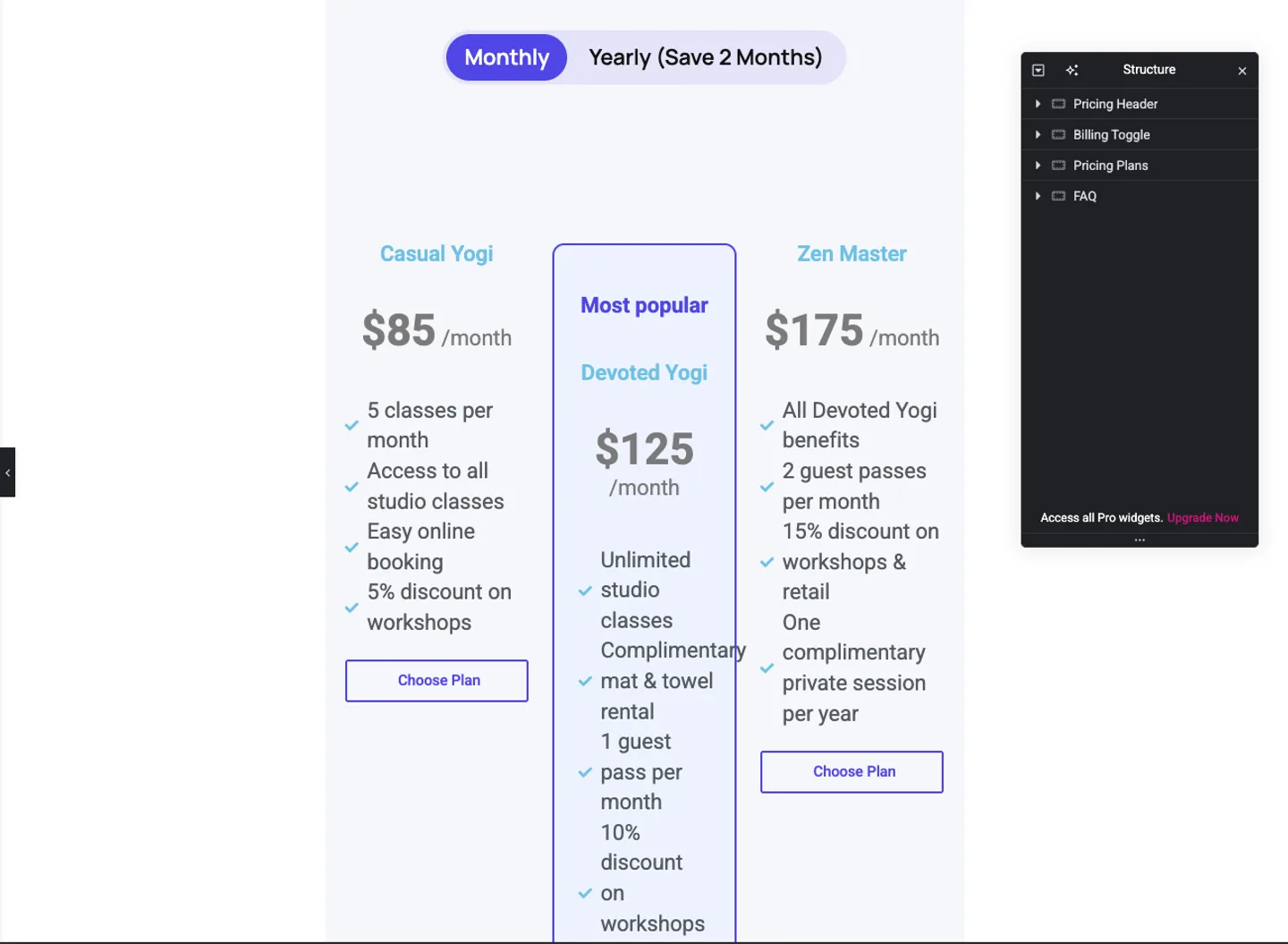
In Elementor 4.3.5, the pricing prompt above produced four named containers (Pricing Header, Billing Toggle, Pricing Plans and FAQ), with three plans and the middle one featured. Clicking "Yearly" changed $85, $125 and $175 per month to $850, $1250 and $1750 per year. Every heading, list item and button stayed an ordinary Elementor widget that can be restyled from the panel.
WPBakery: shortcodes with careful escaping
Layout_WPBakery converts the same tree into core WPBakery elements: vc_row, vc_column, vc_custom_heading, vc_column_text, buttons and vc_raw_html for the toggle. Most of the work is in the details of the format:
- Column widths are fractions.
fraction()snaps each percentage to the nearest of WPBakery's 1/12-based fractions, so 33.333 becomes1/3and 24 becomes1/4. - Attributes need WPBakery's own escaping. A double quote is stored as two backticks, and square brackets would end the shortcode early:
public static function attr( $value ) {
	return str_replace( array( '"', '[', ']', "\n", "\r" ), array( '``', '[', ']', ' ', '' ), $value );
}
- Raw HTML is base64-encoded and URL-encoded, which is how WPBakery stores
vc_raw_html. - Rows get
vc_custom_CSS classes for padding and background colour, the same way WPBakery's design options do.
The test suite checks that the opening and closing tags balance, that a heading Plans "that" [fit] comes out as Plans ``that`` [fit], that the toggle survives the base64 round trip, and that WordPress's own get_shortcode_regex() parses the output. In the backend editor, the shortcodes are inserted the way WPBakery's template panel does it, through vc.storage.parseContent and vc.shortcodes.create.
Getting the JSON reliably
The schema and the converters only help if the model returns complete JSON. Live testing surfaced three separate problems.
Runaway output on flash
With thinking disabled (budget 0) and a normal temperature, gemini-2.5-flash would sometimes start repeating a phrase inside a JSON string and continue until it hit the output limit. The truncated answer couldn't be parsed. Three changes fixed it:
- Hard caps in the schema. The image-description schema sets a
maxLengthon every field (160 characters for alt text, 900 for descriptions). In the code's words: "Hard caps stop the runaway repetition flash models sometimes produce in structured output." - A small thinking budget for structured vision output, 512 tokens instead of 0.
- Low temperature for structured answers. Every JSON task except layouts is capped at 0.3.
Empty price objects on pro
Layouts run on gemini-2.5-pro by default. With the minimum thinking budget, the model returned well-formed JSON in which the price objects were empty: plan names without amounts or features. The schema was satisfied, but the result was useless. Layout requests now set an explicit budget:
if ( 'layout' === $req['task'] ) {
	// Layout JSON is long; give it room regardless of the copy-oriented default.
	$args['max_tokens']      = max( 12288, (int) Settings::get( 'max_tokens', 4096 ) );
	$args['thinking_budget'] = 2048;
	$args['timeout']         = 150;
	$args['temperature']     = min( isset( $args['temperature'] ) ? $args['temperature'] : (float) Settings::get( 'temperature', 0.7 ), 0.7 );
}
(from Generator::run)
With 2,048 thinking tokens, a layout takes roughly 15 to 45 seconds, and the price objects come back filled. That's slow for an editor action, so the request raises the PHP time limit to 180 seconds (shared hosts often default to 30), and the modal shows a progress state rather than appearing frozen.
One retry, near-deterministic
If parsing still fails, because the JSON is malformed or the finish reason shows it was cut off, the generator retries once at temperature 0.1. The retry is logged as a separate request in Usage Logs, so its cost stays visible. A second failure returns a clear, retryable error that also suggests increasing Max Output Tokens when the answer was truncated.
A bug that had nothing to do with AI
One QA failure turned out not to involve the model at all. On a site using plain permalinks, the REST root is /?rest_route=/, and appending a route that carries its own query string produced a URL with two ? characters. Every request with a query string failed. restUrl() now joins with & when the base already contains a ?, and two Jest tests cover both permalink styles.
Trade-offs
- The neutral tree limits what the AI can design. It can only use the 15 widget types the converters support. That's deliberate: every element it produces can be edited in the builder, but there are no custom CSS effects.
- Images are placeholders. The model writes a description of the ideal photo into the image's alt text. Choosing the actual image is left to the user.
- Layouts take time. 15 to 45 seconds on gemini-2.5-pro is the price of complete pricing tables. Short copy tasks on flash finish in a second or two.
- WPBakery output is verified by tests, not a live session. We tested the shortcode generator against WordPress's shortcode parser, and the Elementor path was tested live in Elementor 4.3.5.
Conclusion
The approach is to keep the AI's output in a small, schema-enforced format you control, normalise it hard, and let deterministic code produce each target format. The model writes the copy and plans the structure, and the converters handle IDs, widths, escaping and editor APIs. DEV3 AI Content & Layout Builder is being prepared for release on CodeCanyon and the DEV3 marketplace, and the case study covers the copywriting, SEO and image features as well. If you want AI built into your own editing tools, talk to our AI implementation team.