Giving a language model the power to hand out discounts is an easy way to lose money. A model doesn't know what a hoodie costs you, it can't add up today's discounts, and it will happily write "50% OFF EVERYTHING" if the context points that way. When we built DEV3 AI Smart Coupons & Dynamic Discounts, our WooCommerce plugin for cart-abandonment offers, we still wanted the AI to do what it is good at: picking the incentive most likely to keep a particular shopper, and writing a short, friendly message. This article explains how the plugin lets the AI choose the deal while the server decides what the deal is allowed to cost.
The pipeline: AI in the middle, rules on both sides
When the storefront script detects a moment where shoppers tend to leave (exit intent, idle time, a hidden tab or a fast scroll-up), it calls a same-origin, rate-limited REST endpoint. Offer_Engine::evaluate() then runs a fixed sequence of gates, and the AI is only one of them:
- Session and reuse. No WooCommerce session means no offer. A shopper who already has an active offer gets that same offer back, never a second one.
- Cart and minimum spend. An empty cart, or one below the merchant's minimum, stops here.
- Once per day. One offer per session, email and (optionally) IP address per day. All three are stored only as keyed HMAC hashes made with the site salts.
- Risk threshold. A deterministic, explainable score from 0 to 100, covered below.
- Daily budget. If today's discount budget is used up, nothing is offered.
- Cooldown. One evaluation per session every 15 minutes, so failed evaluations can't hammer the API.
- AI proposal (optional), followed by clamping.
- Fallback. If the AI is off, fails or returns something unusable, a rules-based offer scaled by risk takes its place, or no offer at all if the merchant prefers that.
The rest of this post is about step 7: what the model is allowed to see, what it returns, and how Rules::clamp() turns that proposal into something safe.
The risk score is not AI
We kept the abandonment score out of the model on purpose. Risk_Score is a weighted additive model with named factors: exit intent is worth 30 points, idle time up to 25, a cart well above the store's average order 20, a first-time visitor 10, no previous orders 10. Loyal and recently active customers lose points. The weights can be changed through the aiscd_risk_weights filter.
There were two reasons. A merchant can see exactly why a shopper scored 81, and the simulator in the Rules tab lists every factor with its points. It also means the threshold check is free and instant, so most visitors never cause an API call at all.
What the model sees
The prompt contains anonymous cart context and nothing else: currency, subtotal, item count, up to 8 category names, the store's average order value, the risk score and its reasons, the trigger and page type, a new-or-returning segment, and the limits. A PHPUnit test sets a shopper email and IP address, captures the outgoing request body and asserts that neither appears in it.
The limits are worth a closer look, because the plugin narrows them before the request goes out:
'limits' => array(
	'allowed_types'             => $allowed,
	'percent_range'             => array( (int) $rules['min_percent'], (int) min( $rules['max_percent'], floor( $elig['max_ratio'] * 100 ) ) ),
	'fixed_range'               => array( (float) $rules['min_fixed'], (float) $rules['max_fixed'] ),
	'urgency_minutes_range'     => array( (int) $rules['urgency_min'], (int) $rules['urgency_max'] ),
	'prefer_smallest_effective' => true,
),
(from Offer_Engine::ask_ai)
The percentage range is already capped by the margin room of this specific cart. Free shipping is removed from the allowed types when no shipping zone has a free-shipping method that accepts coupons. Telling the model the real limits makes a good first answer more likely, but none of the safety depends on the model respecting them.
The answer comes back as structured JSON with a response schema: type is an enum of the allowed types, amount and urgency_minutes are numbers, and headline, message, cta and reason each carry a maxLength. Hard length caps in the schema stop the runaway repetition that flash models sometimes produce in structured output, and another test asserts that every one of those string fields has one.
Clamping: never trust a field
Rules::clamp() receives the proposal, the cart snapshot, the merchant's rules and a context (remaining budget, whether free shipping is possible, banner settings). Its docblock sums up the approach: "Never trusts any field of the proposal."
Type and amount
A type that isn't allowed is replaced with the merchant's preferred fallback type. The amount is parsed defensively: anything that isn't a finite number becomes 0, which the minimum then lifts. The test suite feeds it '1e9', 'NaN' and -40. They come out as the maximum, the minimum and the minimum, and a negative number never turns into a large positive discount.
The margin floor, line by line
This is the core of the plugin. Rules::eligibility() walks the cart lines and computes the room each line has above cost plus the merchant's minimum margin:
$room = null === $cost ? $total : $total - $cost * $qty * ( 1 + $margin );
if ( '' === $reason && $room <= 0.0001 ) {
	$reason = 'margin';
}
if ( '' !== $reason ) {
	$excluded[] = array( 'product_id' => $pid, 'reason' => $reason );
	continue;
}
$lines[]     = $line + array( 'room' => $room );
$subtotal   += $total;
$room_total += $room;
$max_ratio   = min( $max_ratio, $room / $total );
(condensed from Rules::eligibility)
Two decisions matter here.
- The tightest line sets the ratio. WooCommerce spreads percentage and fixed-cart discounts across the discounted lines in proportion to their totals. A 12% discount takes 12% off every eligible line, so the cart's average margin is irrelevant. The line with the least room decides the maximum.
- Lines with no room are excluded, not fatal. A product sold almost at cost drops out of the coupon, and the rest of the cart can still be discounted. Sale items, excluded products, excluded categories and (optionally) products with no cost recorded are dropped the same way, each with a named reason.
Cost comes from a product meta key the merchant chooses (for example _wc_cog_cost from a cost-of-goods plugin), or from the aiscd_product_cost filter.
One of the RulesTest cases shows the arithmetic. With a 10% minimum margin, a $100 line costing $80 has a floor of $88 and so $12 of room (12%). A second line of $50 costing $20 has $28 of room (56%). The model asks for 20%, and the clamp returns 12% with an amount_capped adjustment. The test then checks the invariant directly: the discounted price of the first line is still at least cost × 1.1.
Then the other caps
For a percentage, the clamped amount is the smallest of the merchant's maximum percentage, the margin ratio and the remaining budget divided by the eligible subtotal. For a fixed amount, the caps are the maximum fixed amount, the margin room in money, the maximum percentage of the eligible cart (so $20 off a $40 cart can't slip past a 15% cap) and the remaining budget. Fixed amounts are rounded down to the cent, never up. If the result falls below the merchant's minimum, the proposal is rejected and the deterministic fallback gets its turn.
Free shipping is costed as the cart's actual shipping, or a merchant estimate, and it has to fit inside the total margin room and the budget too.
In the live run
During the live check against the Google Gemini API, we used a thin-margin cart, with products costing 85% of their price, under the default 15% minimum margin. The model proposed a $5 fixed discount. Each line had 90 × (1 − 0.85 × 1.15) = $2.025 of room, so the clamp floored the offer to $2.02. Nothing in the model's answer could have produced a larger coupon.
Copy that can't lie about the deal
Clamping the number isn't enough if the headline still says "50% off". The model is told never to write digits, prices, percentages, currency symbols, codes, links or emojis, and to use two placeholders instead: {discount} and {minutes}. The plugin then refuses any copy that ignores this:
public static function is_safe( $text ) {
	if ( '' === $text ) {
		return false;
	}
	if ( preg_match( '/\d|https?:|www\.|[<>]|@|%|\$|€|£|¥|₹/u', $text ) ) {
		return false;
	}
	// Only our two placeholders are allowed.
	$stripped = str_replace( array( '{discount}', '{minutes}' ), '', $text );
	return false === strpos( $stripped, '{' ) && false === strpos( $stripped, '}' );
}
(from Copy::is_safe)
If any of the three fields fails, all three are replaced with the merchant's own templates from the Banner design tab, and the offer records a copy adjustment. Placeholders are filled from the clamped offer, so the label always matches the real coupon: "10% off", "$2.02 off" or "free shipping". Models often write "{discount} off", which would come out as "10% off off", and Copy::fill() collapses that too.
The test with deliberately malicious output sends <script>alert(1)</script>90% OFF EVERYTHING as the headline and a link in the message. The resulting offer has a 20% amount (the test's cap), no <, no "90%", no link, and a headline that comes from the template and states the real 20%.
Turning the offer into a coupon nobody else can use
A clamped offer becomes a real WC_Coupon in Coupon_Factory::create():
- a unique code from an unambiguous alphabet, such as
SAVE-FXKZTRS7 - usage limit 1 and 1 per user, individual use, sale items excluded
- restricted to the product IDs that passed the margin check, with the margin-excluded products added to the excluded list
- for fixed amounts, a minimum spend equal to the cart value the margin was checked against, so removing items can't turn $10 off $150 into $10 off $15
- email restriction when the shopper's email is known
- an expiry equal to the countdown shown in the banner
A filter on woocommerce_coupon_is_valid then binds the code to the WooCommerce session it was issued to. A code pasted into another browser fails with "This personal offer belongs to another shopping session", unless the logged-in customer's email matches the restriction. The one-click "Apply" button uses an HMAC token over the code and the session's customer ID, because a normal WordPress nonce is the same for every guest.
Finally, the offer's estimated value is reserved against the daily budget as soon as it is issued, not when it is redeemed. A burst of offers can't overshoot the budget just because shoppers haven't checked out yet.
Verifying it end to end
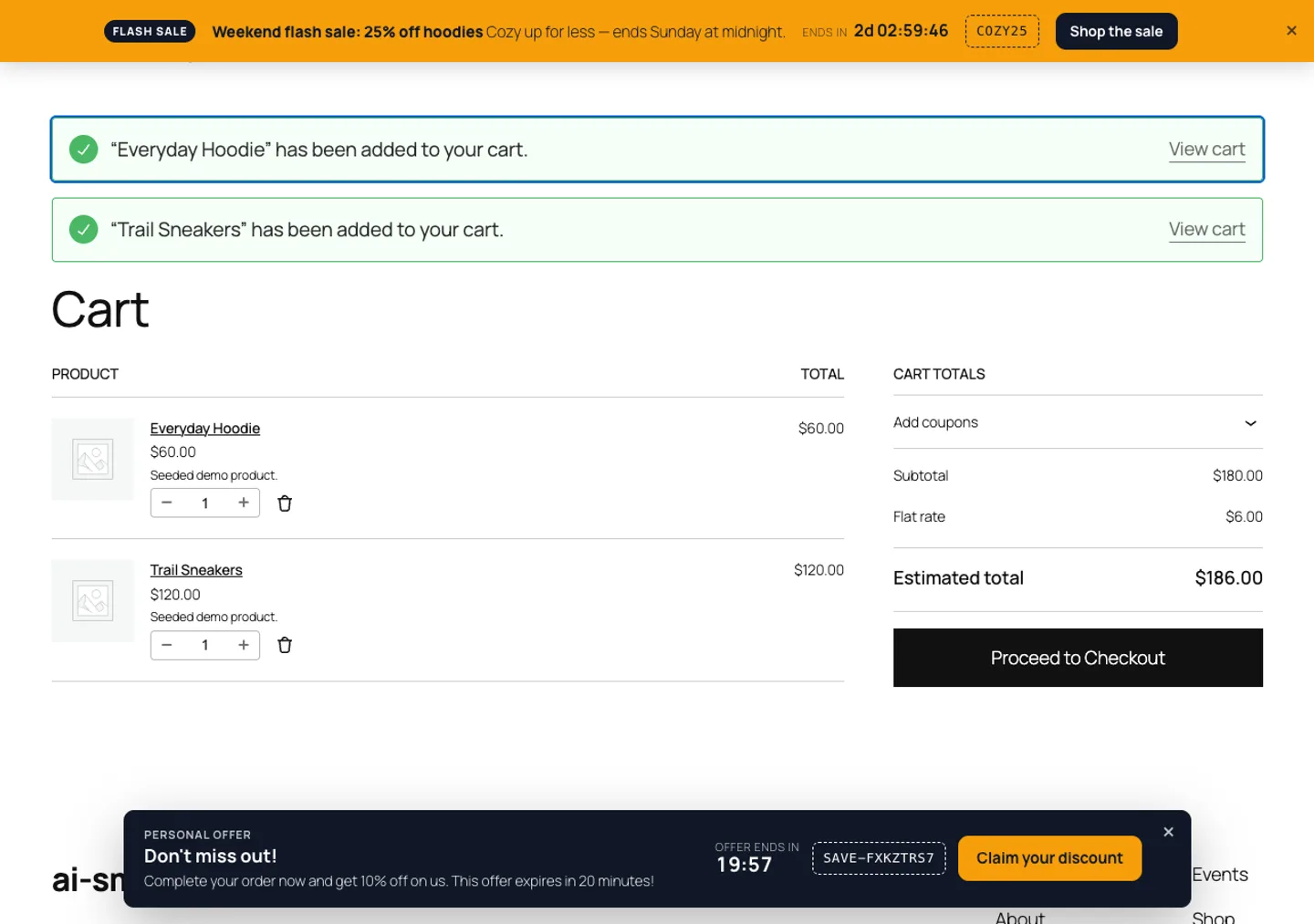
The PHPUnit suite has 45 tests with 216 assertions, and the Jest suite 17 tests for the tracker, countdown, consent and banners. Unit tests can't show that WooCommerce, the block cart and the coupon rules work together, so we also ran a full guest journey on a WordPress install with the block cart:
- Add two products to the cart, then move the pointer out of the window.
- An AI offer appears in the floating bar: a 10% coupon with a 20-minute countdown.
- Click "Claim your discount". The coupon applies through the Store API and the banner switches to "Discount applied".
- Check out with cash on delivery. The order moves to processing and the offer is marked redeemed with the order total and discount.
- In a new cart, try the same code again. WooCommerce rejects it because the usage limit has been reached.
- The Analytics tab shows offers shown, applied and redeemed, the discount cost, and the order link.
Trade-offs
- Cost data decides how good the floor is. Products without a recorded cost are either discounted under the normal caps or skipped, depending on a setting. The plugin can't protect a margin it doesn't know.
- The budget is an estimate. It reserves the value calculated at issue time. A percentage coupon applied to a cart that later shrinks costs less than was reserved, never more.
- The tightest line can make offers small. One thin-margin product limits the percentage for the whole coupon, unless it has no room at all and drops out. That errs on the side of keeping the margin.
- The AI adds latency. The storefront timeout defaults to 20 seconds and can be changed through a filter. When it's exceeded, the deterministic fallback answers.
Conclusion
The pattern carries over to any feature where a model proposes something that costs money: describe the real limits in the prompt, constrain the answer with a schema, then recompute every value on the server as though the model never saw the limits. DEV3 AI Smart Coupons is being prepared for release on CodeCanyon and the DEV3 marketplace, and the case study covers the rest of the plugin. If you want AI features that can't overspend, talk to our AI implementation team.