The requirements for WorkPro, our multi-tenant company management platform, asked for a "Matrix RBAC Engine" with "isolated role-based data boundaries". In practice that meant two things. Each organization should be able to design its own roles, such as a "Finance Officer" or a "Project Lead", without us shipping code. And a permission should say how much data a user can reach, not only whether they can reach it. Here is how we built it on Next.js 15 and MongoDB, with most of the design in the type system and the query layer rather than the UI.
Two layers: persona decides where, roles decide what
Every user has one of six base personas: Super Admin, Organization Admin, Department Manager, Sales Associate, Standard Staff or External Client. The persona controls which area they work in: the platform console, the organization workspace, or the client portal.
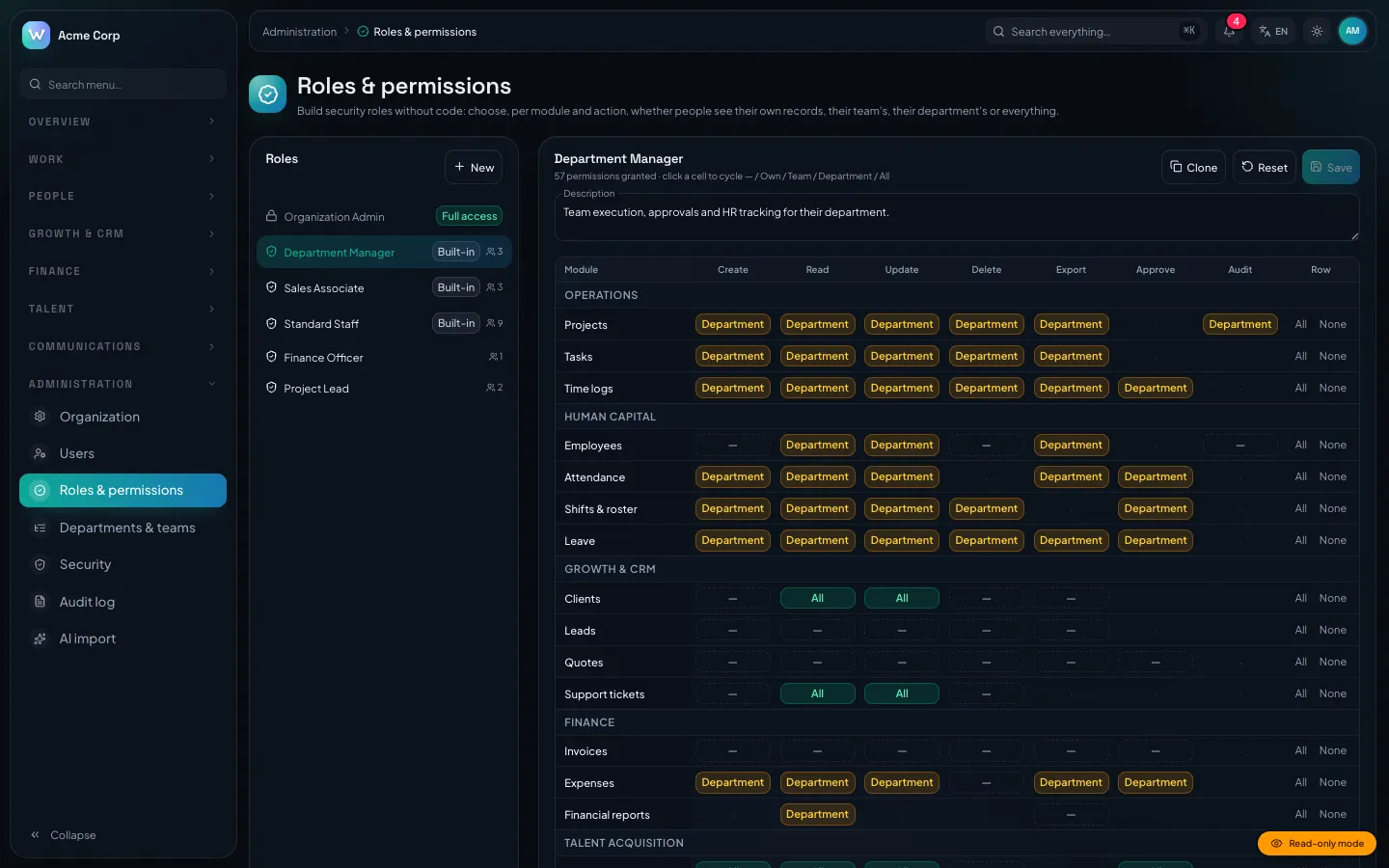
On top of the persona, a user can hold any number of organization-defined security roles. A role is a matrix of resource × action → scope, edited in a grid on the settings page. Every organization starts with editable copies of the built-in Manager, Sales and Staff roles. Those can be reset but not deleted. Custom roles can be created, cloned and deleted, and deleting one $pulls it from every user who held it.
A permission vocabulary the compiler checks
There are 22 resources and 7 actions (create, read, update, delete, export, approve, audit), but most of the pairings mean nothing. Nobody approves a setting or deletes the audit log. So instead of generating every combination, we list the valid ones:
export const RESOURCE_ACTIONS = {
  projects: ['create', 'read', 'update', 'delete', 'export', 'audit'],
  tasks: ['create', 'read', 'update', 'delete', 'export'],
  time: ['create', 'read', 'update', 'delete', 'export', 'approve'],
  // … 22 resources in total
  settings: ['read', 'update'],
  audit: ['read', 'export'],
} as const satisfies Record<Resource, readonly Action[]>;

/** Only real resource/action pairs are permissions (e.g. 'invoices.approve', never 'settings.delete'). */
export type Permission = { [R in Resource]: `${R}.${(typeof RESOURCE_ACTIONS)[R][number]}` }[Resource];
(Condensed from types/rbac.ts.)
The mapped template-literal type expands to a union of exactly 104 strings. satisfies makes sure every resource has an entry while keeping the literal tuples the template needs. So can(user, 'settings.delete') fails tsc. The matrix editor reads the same object.
Scopes are ordered self < team < department < all and labelled Own, Team, Department and All. A grant is Partial<Record<Permission, Scope>>, and a missing key means not granted.
Computing effective permissions
When a user holds several roles, mergeGrants combines them by keeping the widest scope for each permission. This matches how organizations already think about access: adding a role should add capability, never quietly remove it. loadMembership runs once per request through React's cache:
if (role === 'SUPER_ADMIN') return { perms: FULL_GRANT, departmentId: null, departmentIds: [], teamIds: [] };
const u = await User.findOne({ _id: userId, tenantId }).select('roleIds departmentId managedDepartmentIds teamIds').lean();
if (!u) return { perms: {}, departmentId: null, departmentIds: [], teamIds: [] };
let perms: PermissionGrant;
if (role === 'ORG_ADMIN') perms = FULL_GRANT;
else if (role === 'CLIENT') perms = {};
else {
  const roles = u.roleIds?.length ? await RoleModel.find({ tenantId, _id: { $in: u.roleIds } }).select('grants').lean() : [];
  perms = roles.length ? mergeGrants(roles.map((r) => sanitizeGrant(r.grants as Record<string, unknown>))) : DEFAULT_ROLE_GRANTS[role];
}
(Condensed from lib/auth/session.ts.)
Three decisions are worth calling out:
- Admins can't lock themselves out. The Organization Admin's grant is not a stored role. It is
FULL_GRANT, computed in code, so no matrix edit can remove an admin's access to the roles page. - Clients get nothing from the matrix. External Clients use the portal, which has its own wrappers and queries.
- Stored grants are untrusted. Role documents are user-edited data, and TypeScript types disappear at runtime.
sanitizeGrantkeeps only keys that passisPermissionand values that passisScope, so a stale key from a renamed permission is dropped rather than granting anything.
Role changes leave a trail. When a role is saved, the service compares the old and new grants and returns a { from, to } entry for each changed permission. The saveRoleAction wrapper writes that delta to the audit log as a PERMISSIONS entry. "Who gave Sales delete rights on quotes?" has a direct answer.
Turning a scope into a MongoDB filter
A permission check answers "may this user list projects?". The harder question is which projects. scopeFilter turns the held scope into a query fragment, using a per-collection map of how records link to people. For projects that map is { user: ['ownerId', 'members.userId'], department: 'departmentId', team: 'teamId' }.
const scope = heldScope(ctx.user, permission);
if (!scope) throw new ForbiddenError();
if (scope === 'all') return {};
const me = new Types.ObjectId(ctx.user.id);
const ors: Record<string, unknown>[] = (fields.user ?? []).map((f) => ({ [f]: me }));
if (scope === 'department' || scope === 'team') {
  if (scope === 'department' && fields.department && ctx.user.departmentIds.length) ors.push({ [fields.department]: { $in: oid(ctx.user.departmentIds) } });
  if (fields.team && ctx.user.teamIds.length) ors.push({ [fields.team]: { $in: oid(ctx.user.teamIds) } });
  const people = scope === 'department' ? extra.departmentUserIds : extra.teamUserIds;
  if (people?.length) for (const f of fields.user ?? []) ors.push({ [f]: { $in: oid(people) } });
}
// Nothing to match on means nothing is visible (never "everything").
if (!ors.length) return { _id: { $exists: false } };
return ors.length === 1 ? ors[0] : { $or: ors };
(Body of scopeFilter in lib/auth/scope-filter.ts.)
The second-to-last line is the safety rule. For a user with Department scope but no department, querying a collection without user fields, a naive version returns an empty object, and an empty MongoDB filter matches every document. We return a filter that matches nothing instead, so an unclear case shows the user less, never more.
The same rule backs list endpoints, omni-search providers and the single-record check inScope. A record that doesn't appear in a list can't be opened by guessing its URL either. On the client, useCan hides buttons, but that is only cosmetic: every server action goes through a wrapper that calls assertPermission again.
Defence in depth: the tenant plugin
Scopes work inside a tenant. Isolation between tenants does not rely on anyone remembering a filter. Every tenant model is registered with defineModel(name, schema, { tenant: true }), which attaches this Mongoose plugin:
export function tenantPlugin(schema: Schema, opts: { modelName: string }): void {
  for (const op of QUERY_OPS) {
    schema.pre(op, function () {
      const options = this.getOptions();
      if (options.crossTenant) return;
      if (!hasClinicFilter(this.getFilter() as Record<string, unknown>)) throw new TenantScopeError(opts.modelName, op);
    });
  }
  // … aggregate: the first stage must be a $match on tenantId
}
(Condensed from lib/db/tenant-plugin.ts.)
A note on the name: the helper is called hasClinicFilter because this infrastructure was ported from DEV3's ClinicPro. What it checks is a non-null tenantId in the filter, either at the top level or inside $and. A bare findById throws before the query reaches MongoDB, so a missing scope shows up as an error in development instead of a data leak in production. Cross-tenant code must opt in with crossTenant: true. Separately, assertSameTenant reports another organization's document as "not found", so IDs can't be probed.
Trade-offs
- Union semantics can't subtract. If you want "Manager minus exports", you clone the role and edit the copy. We chose predictability over deny rules.
- Department and Team scopes cost extra queries. Collections that link only through people need the user IDs in the caller's departments and teams. We memoise those per request, but large departments make the
$inlists longer. - The vocabulary is fixed per release. Customers design roles, not resources. A new resource is a code change, which is deliberate, because it needs real enforcement.
- A role lookup on every request. Grants are not baked into the session token, so changes apply on the next request, at the cost of that lookup.
Conclusion
Customer-designed RBAC holds up when every layer applies the same rule: a compile-time vocabulary, sanitized stored grants, merging by widest scope, scopes that fail closed when turned into filters, and a tenant guard underneath. WorkPro's 260 automated test cases in 19 files, which run against a real MongoDB, include tenant isolation and scope filtering.
The WorkPro case study covers the wider architecture, and the source is in our marketplace. The live demo is read-only and has one-click logins for every persona,. If your product needs access control like this, talk to our SaaS engineering team.